Tissue

- Base:
- UDataAsset
- Type:
- UNTissue
- Header File:
- NexusWorldAssembly/Public/Cell/NTissue.h
An ensemble of similar (or dissimilar in structure but same in origin) cells that together carry out a specific function.
A tissue defines the Cells which can be used in that specific tissue. If multiple Tissues are assigned to an Organ a combinatory effect will apply where all tissue entries will be flattened down into a single list, similarly to how sub-tissues work.
Yes — they are like Grammars.
Creating
A UNTissue can be created through the common UDataAsset creation wizard.

Or as an added bonus it can be created through its own direct asset factory from the Content Browser context-menu, under NEXUS > NTissue.
Dataset
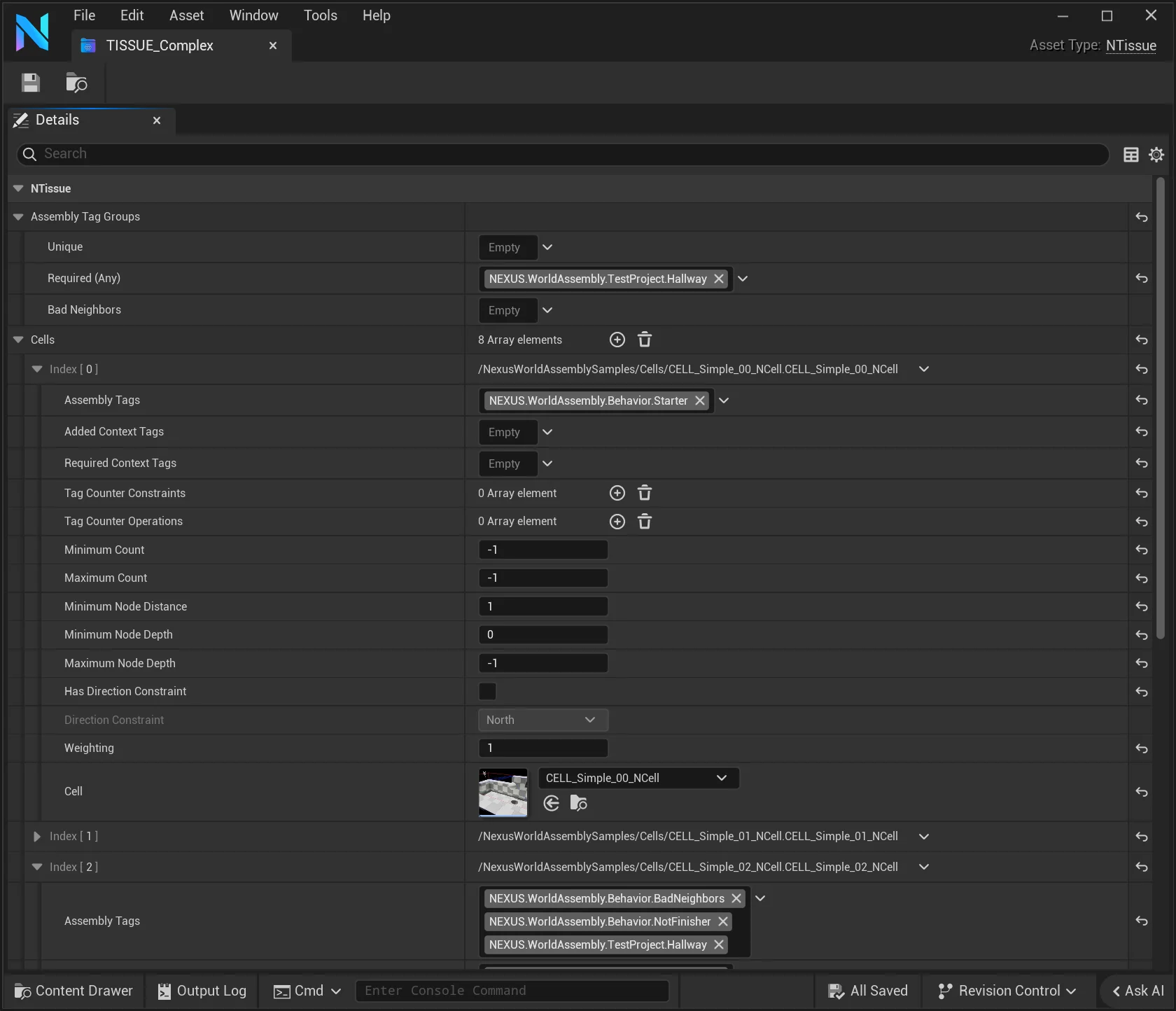
Tag Groups
These are collections of tags that correspond to specific described behavior when used. They pull their possible tags from NEXUS.WorldAssembly.*. User-created tags should be added under that namespace if you wish for them to show up in the details inspector.
Unique
Identifying an FGameplayTag as part of Tag Groups > Unique will create a behavioral contract during the assembly operation of a UNOrganComponent that ensures that once a Cell is placed that has that FGameplayTag as part of its Assembly Tags, no other Cell with that FGameplayTag can be used.
As an example, you may want to have only one hero piece appear in a given assembly operation. You could add your
Herotag to all the hero Cell entries in theirAssembly Tagsand would then also add it to theTag Groups > Unique.
RequiredAny
When an FGameplayTag is added to Tag Groups > Required (Any), after the generation of the Cell Graph during an assembly operation, the graph will be validated to ensure that at least one UNCell was used that had this FGameplayTag associated to it via Assembly Tags. If none were, the graph is regenerated.
BadNeighbors
When an FGameplayTag is part of the Tag Groups > Bad Neighbors it prevents any cell in that group from being connected to another of that same group.
Unique & RequiredAny Special Behavior
A common requirement when generating gameplay spaces is ensuring that there is some sort of Boss encounter. This is where combining Unique and RequiredAny has a compound effect with a little extra magic behind the scenes. In a contrived example, you would have two UNCell boss-room entries, both would be set to have a MinimumCount and MaximumCount of 1, and would get tagged with some FGameplayTag that ends up in Tag Groups > Unique and Tag Groups > Required (Any). When it's set up like this, the MinimumCount is ignored, as well as the "every" part of Required when validating the graph.
Cells
| Settings | Default | |
|---|---|---|
| Assembly Tags | Tags used to define behavior during the assembly process, pulled from NEXUS.WorldAssembly.*. See Tagging | (Empty) |
| Added Context Tags | Tags which get accumulated based on UNCell usage, and are provided for context post-assembly. Initial Context Tags are established by the FNAssemblyOperationSettings used. Default settings are also available in the Project Settings. Accessible by INCellInitialized interface via the ANCellLevelInstance. | (Empty) |
| Required Context Tags | Tags that must exist in the accumulated Context Tags of the assembly operation for this cell to be placable. | (Empty) |
| Tag Counter Constraints | Requirements for this cell to be made available for selection. Every constraint must pass for the cell to remain a candidate. If a constrained FGameplayTag is not present in the TagCounter, its count is compared as 0 rather than automatically failing. | (Empty) |
| Tag Counter Operations | If a cell is placed the operations will be applied against the Tag Counters of the assembly operation. This is only replicated outside of the organ at the end of the pass. Counts are signed — a Subtract that takes a tag below zero is no longer clamped, so the resulting value may be negative. | (Empty) |
| Minimum Count | A minimum number of times this cell must be used in the generated FNAssemblyGraph for the graph to validate. If unmet, the graph is regenerated. (0 no constraint) | 0 |
| Maximum Count | The maximum number of times this cell can be used in the generated FNAssemblyGraph. (0 unlimited usage — to stop a cell from being generated, remove it from the tissue rather than setting a count) | 0 |
| Minimum Node Distance | The minimum number of cell links away this cell must be to be used again. | 1 |
| Minimum Node Depth | The minimum graph depth at which this cell may be used, as a 1-based node depth. The start cell is depth 1, its direct neighbors depth 2, etc. A value of N first allows the cell at depth N. (0 no constraint; 1 is the start cell and likewise unconstrained) | 0 |
| Maximum Node Depth | The maximum graph depth at which this cell may still be used, as a 1-based node depth. A value of N allows the cell up to depth N; a value of 1 restricts it to the start cell only. (0 no constraint) | 0 |
| Has Direction Constraint | When enabled, this cell may only be placed toward Direction Constraint relative to the Organ's directional reference point. | false |
| Direction Constraint | The compass heading — measured from the Organ's directional reference point out to the candidate's placement — this cell is restricted to while Has Direction Constraint is set. The reference point is chosen per Organ by its Direction Mode (start bone, organ center, or dynamic centroid). Enforced within the project/operation Direction Tolerance (degrees ±) during cell filtering. | North |
| Weighting | Relative weight for random selection during generation. | 1 |
| Cell | A soft-object reference to the UNCell asset that will be consumed. | n/a |