Project Settings
From the Edit > Project Settings window, find the Guardian section.
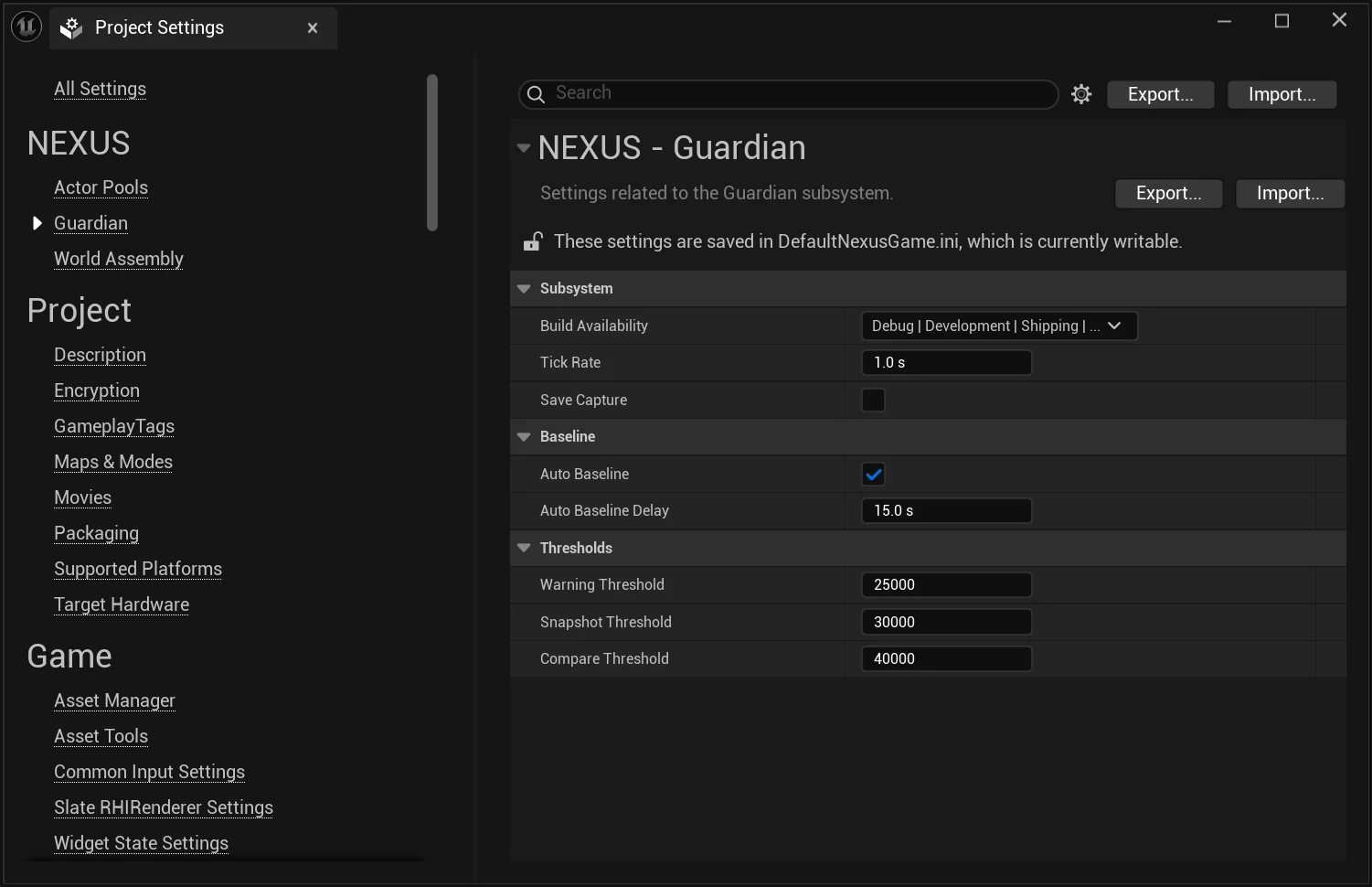
Subsystem
| Setting | Description | Default |
|---|---|---|
Build Availability | Bitmask of ENBuildConfigurationAvailability flags (Debug, Development, Shipping, Test, Editor) controlling which build configurations the UNGuardianSubsystem is created in. Set to None (0) to disable the subsystem entirely. | Debug, Development, Test, Editor (everything except Shipping) |
Tick Rate | How often the subsystem polls the live UObject count (seconds). Lower values catch threshold crossings sooner at the cost of more sampling work. Clamped 0.0 – 300.0. | 1.0 |
Save Capture | When true, snapshot and compare results are written to the project's Saved/Logs folder with the prefix NEXUS_Snapshot_* and NEXUS_Compare_*. Disk output is not required for comparison — snapshots are also held in memory. | false |
Baseline
| Setting | Description | Default |
|---|---|---|
Auto Baseline | When true, the subsystem calls SetBaseline() automatically after OnWorldBeginPlay. Disable when you want to anchor the baseline at a more representative point in the game's lifecycle (e.g. after a level loads, after the main menu is dismissed). | true |
Auto Baseline Delay | Seconds to wait after world begin play before the auto-baseline fires. A short delay lets transient startup objects settle so the baseline reflects steady-state object counts. Ignored when Auto Baseline is disabled. | 15.0 |
Thresholds
| Setting | Description | Default |
|---|---|---|
Warning Threshold | The number of UObjects added after SetBaseline() at which a warning is logged. | 25000 |
Snapshot Threshold | The number of UObjects added after baseline at which an FNObjectSnapshot is captured. The snapshot is held in memory and (if Save Capture is enabled) written to disk. | 30000 |
Compare Threshold | The number of UObjects added after baseline at which a second snapshot is captured and diffed against the first. The detailed compare summary is written to the project log folder when Save Capture is enabled. | 40000 |
info
All fields below Build Availability are disabled in the editor when Build Availability is set to None, since the subsystem will not be created and the values would have no effect. The threshold values must also be strictly increasing (Warning < Snapshot < Compare); the subsystem will refuse to set a baseline and log an error if they aren't.
tip
The defaults intentionally fire the warning, snapshot, and compare actions across a 15,000-object spread (25k → 30k → 40k). If your project routinely creates more than 25k UObjects after a stable baseline, raise all three thresholds proportionally rather than disabling them — the staged ladder is what makes the leak detection useful.