Developer Overlay

- Base:
- UNDeveloperOverlay
- Type:
- UNDynamicRefsDeveloperOverlay
- Header File:
- NexusDynamicRefs/Public/NDynamicRefsDeveloperOverlay.h
By going to Tools > NEXUS > Dynamic References, you can create an UNEditorUtilityWidget wrapped version of /NexusDynamicRefs/WB_NDynamicRefsDeveloperOverlay which will list every live ENDynamicRef slot and FName bucket registered with the UNDynamicRefSubsystem.

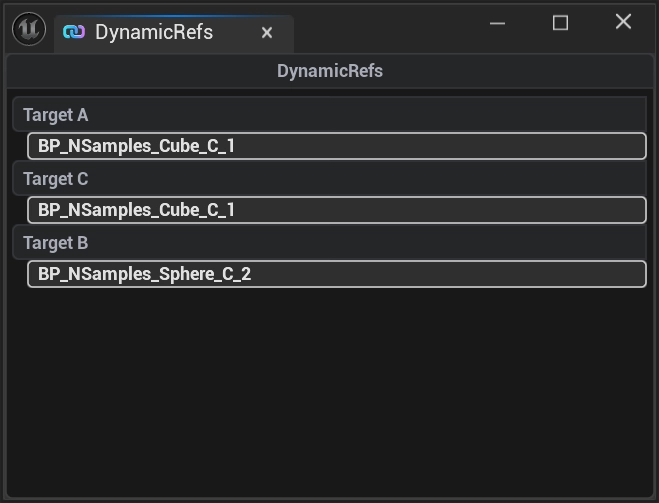
Layout
The overlay is split into two stacked lists, each preceded by a header that auto-hides when its list is empty:
| Section | Contents |
|---|---|
Dynamic References | Every populated ENDynamicRef slot, one row per slot. |
Named References | Every populated FName bucket, one row per bucket (this includes FGameplayTag entries as they are still FName under-the-hood.) |
Each row is a UNDynamicRefListViewEntry bound to a UNDynamicRefObject wrapper. Inside each row, a nested list contains one button per UObject currently registered to that slot/bucket. When no references are present in any world, the overlay displays a No References Found banner.
The overlay only holds TWeakObjectPtrs to the displayed UObjects — it never roots them, never extends their lifetime, and never crashes when an underlying object is garbage-collected between paints. Because a weak reference expires silently with no delegate to listen for, the overlay polls for staleness every tick (NativeTick → ReconcileStaleEntries) and drops any wrapper row whose tracked objects have all gone away.
Multi-World Support
The overlay subscribes to OnPostWorldInitialization and OnWorldBeginTearDown and automatically binds to every Game / PIE world's UNDynamicRefSubsystem. Each subsystem's OnAdded / OnRemoved delegates feed the same lists, so a PIE session with both server and client worlds shows the union of their registrations.
Click Handling
UNDynamicRefsDeveloperOverlay exposes a BlueprintAssignable delegate, OnButtonClicked(UObject* TargetObject), that fires whenever a row's per-object button is pressed. The shipped Blueprint subclass wires this to actor selection in the editor — clicking a row's button selects that AActor in the level outliner. Subclasses can override this binding to drive any other inspection workflow (focus camera, open property editor, log a stack trace, etc.).