Automation
Every change to main is exercised through CI before it shows up green on GitHub. This page describes what runs, where, and how often.
Pipeline
Every ~5 min the main branch is synchronized to a Perforce depot which gets picked up by our Horde instance. This triggers our Test Runner within a minute to run a Boot Test, as well as Unit Tests in the Editor (Win64). Horde then updates the commit status message in GitHub for the associated tests.
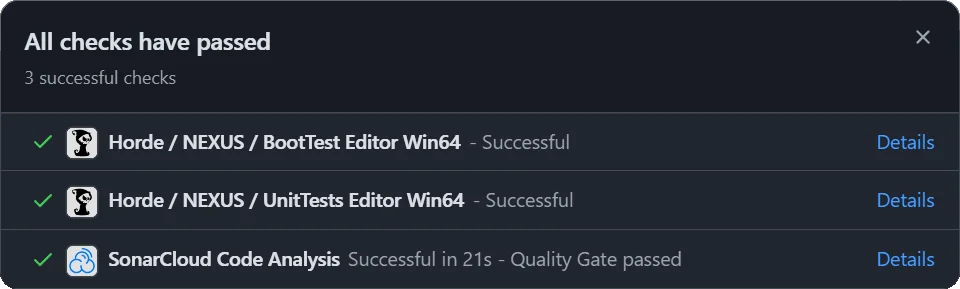
We use Horde + Perforce (rather than GitHub Actions) because the framework reuses Unreal's BuildGraph tooling — TestRunner.xml layers directly onto Epic's BuildAndTestProject.xml. That gives us the same parallel-agent topology and shared-DDC behavior Epic uses internally.
Scheduled Tests
| Test | Description | Cadence |
|---|---|---|
BootTest Editor Win64 | Compiles the project and verifies the Editor boots. | 1m |
UnitTests Editor Win64 | Runs the NEXUS unit-test suite (NEXUS.UnitTests) in the Editor under -nullrhi. | 1m |
PerfTests Editor Win64 | Runs the NEXUS performance-test suite (NEXUS.PerfTests) in the Editor. | 1d |
FuncTests Editor Win64 | Runs project-level functional tests (Project.) in the Editor with rendering. | 1d |
Where Results Land
- GitHub commit status — the green/red dot next to a commit on the NEXUS commit list. The status name matches the test label column above.
- Horde dashboard — the NEXUS project page on the Horde server has the full job history, per-step logs, and the BuildGraph DAG.
- Test reports — each job archives the JSON test report and the Unreal Editor log, surfaced through Horde-side annotations so failures bubble to the top.
While thorough automation is a core pillar of the framework, real-world feedback from users still catches things that scheduled runs do not — please bubble up issues you see while using NEXUS in your own projects.
Running Tests Locally
The same Editor automation suites can be invoked locally — useful when iterating on a fix before pushing. The exact commands and prerequisites are documented in the running-tests skill at TestProject/.claude/skills/running-tests/. Quick reference:
# Unit tests (no rendering needed)
& "<UEROOT>\Engine\Binaries\Win64\UnrealEditor-Cmd.exe" "<NEXUSROOT>\TestProject\NEXUS.uproject" `
  -unattended -nopause -testexit="Automation Test Queue Empty" `
  -ExecCmds="Automation RunTest NEXUS.UnitTests;Quit" -nullrhi
Drop -nullrhi for functional tests; swap NEXUS.UnitTests for NEXUS.PerfTests for performance runs.
Extras
Code Coverage
A quick little command to help out with determining code coverage.
OpenCppCoverage.exe ^
--modules "**NEXUS**" --cover_children --optimized_build ^
--excluded_modules "**NEXUSModulesRules**" --excluded_modules "**NexusSharedSamples**" --excluded_modules "**Editor.dll" ^
--sources "Plugins\ActorPools\Source\NexusActorPools" ^
--sources "Plugins\Blockout\Source\NexusBlockout" ^
--sources "Plugins\Core\Source\NexusCore" ^
--sources "Plugins\DynamicRefs\Source\NexusDynamicRefs" ^
--sources "Plugins\Guardian\Source\NexusGuardian" ^
--sources "Plugins\Picker\Source\NexusPicker" ^
--sources "Plugins\UI\Source\NexusUI" ^
--sources "Plugins\WorldAssembly\Source\NexusWorldAssembly" ^
--excluded_sources .gen. --excluded_sources **\Tests\** --export_type html:TestProject\Saved\CodeCoverage\Report --export_type cobertura:TestProject\Saved\CodeCoverage\Report\cobertura.xml ^
-- D:\EGS\UE_5.7\Engine\Binaries\Win64\UnrealEditor.exe D:\Repositories\dotBunny\NEXUS\TestProject\NEXUS.uproject ^
-unattended -nopause -testexit="Automation Test Queue Empty" -ReportExportPath="Staging\TestResults" -log ^
-ExecCmds="Automation RunTest NEXUS.UnitTests+Tests.Nexus;Quit"